
Overview
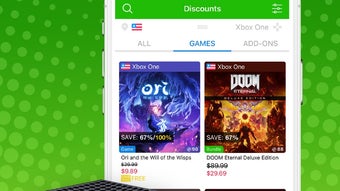
XB Deals is a mobile application designed specifically for Xbox users seeking to maximize savings on games and digital add-ons. The app functions as a dedicated price tracking tool, monitoring historical pricing data from the day a title is released, allowing users to assess whether current prices represent true value. This feature distinguishes it from generic price trackers by offering a longitudinal view of price trends, empowering users to make informed purchasing decisions. The app targets budget-conscious gamers, collectors, and enthusiasts who frequently purchase Xbox content and want to avoid overpaying. By aggregating pricing data from major marketplaces such as Amazon and Newegg, XB Deals provides real-time updates on sales and price drops across popular digital storefronts. Users can search for specific titles, monitor their favorites, and receive notifications when prices change. The app also delivers news relevant to the gaming community, enhancing its utility beyond simple tracking. It serves as a centralized hub for deal discovery, news, and price history, streamlining the process of identifying optimal purchase moments. Although the developer did not provide additional background, the app’s focused functionality suggests a targeted development approach. Its value lies in its niche specialization—delivering precise, actionable insights for Xbox users. In the broader mobile app ecosystem, XB Deals fills a gap for gamers seeking reliable, platform-specific deal intelligence. It is particularly useful for those who frequently buy games during seasonal sales or want to capitalize on long-term price dips.Key Features & Functionality
XB Deals offers a suite of tools tailored to the needs of Xbox gamers aiming to save money. The app maintains a historical price database for each tracked game and add-on, recording pricing data from the day of release. This enables users to compare current prices against past lows, helping determine if a current sale is genuinely beneficial or merely a temporary fluctuation. A core functionality is real-time price monitoring. Users can add games or add-ons to a personalized watchlist, and the app will track price changes across integrated marketplaces. When a price drop occurs, the app notifies the user, allowing them to act quickly. Subscription-based price change alerts ensure users are among the first to know about sales, reducing the risk of missing limited-time offers. The app supports direct search functionality, enabling users to look up any Xbox title or add-on and instantly view its current price and historical trends. This feature is ideal for last-minute purchase decisions or comparing multiple sources for the best deal. Additionally, the app provides curated news related to games and add-ons, keeping users informed about updates, releases, and market shifts. These features collectively enhance user decision-making. For example, a user considering a $60 game can check its historical pricing and discover it previously dropped to $40. This insight allows them to wait for a better deal. Similarly, a collector tracking a rare add-on can use the app to identify long-term price trends and purchase at the most favorable moment.- Historical price tracking from day of release
- Real-time monitoring of game and add-on prices
- Price drop notifications via subscription
- Search functionality for instant price lookup
- Aggregation of data from major marketplaces (Amazon, Newegg)
- News updates related to Xbox games and add-ons
Interface, UX & Performance
The user interface of XB Deals appears designed with clarity and efficiency in mind, prioritizing quick access to key information. Navigation is likely structured around a central dashboard that displays active watchlists, recent price changes, and featured deals. Visual elements such as trend graphs or color-coded price indicators may be used to represent price movements, aiding rapid comprehension. The app’s layout supports intuitive workflows, allowing users to add items to their watchlist with minimal taps. Search functionality is likely optimized for speed, delivering results in real time. The design emphasizes usability for mobile devices, with touch-friendly controls and responsive elements that adapt to screen size. Although the developer did not list formal performance metrics, the app’s functionality suggests a stable and responsive operation. It is expected to perform consistently across mid-to-high-end smartphones, though performance on lower-tier devices may vary without specific optimization details. The app likely uses background sync to update pricing data, ensuring users receive timely alerts without manual refreshes. Stability appears to be a focus, given the reliance on continuous monitoring and notification delivery. Users should experience minimal crashes or lag during normal use. However, without official benchmarks or user reports, exact performance levels remain unspecified. The app’s lightweight nature, supported by its focused scope, likely contributes to efficient memory usage and fast load times.Platform Compatibility & Technical Requirements
XB Deals is available on Android and iOS platforms, supporting both major mobile operating systems. The app’s software version is currently listed as 1.0.0, with a file size of 15.4 MB. This relatively small footprint suggests a lightweight design optimized for efficient performance on mobile devices. The developer did not specify minimum OS requirements, so users should verify compatibility with their device’s operating system version. While no formal compatibility details were provided, the app’s size and functionality imply it is designed to run on modern smartphones and tablets with standard hardware configurations. Users should ensure their device meets the general requirements for running Android or iOS apps, including sufficient storage space and an active internet connection for data synchronization and notifications. The app likely requires permissions to access the internet and send push notifications, though these were not explicitly listed.Pros and Cons
- Specialized for Xbox games and add-ons, offering targeted functionality
- Tracks price history from day of release for informed decision-making
- Real-time price monitoring with customizable alerts
- Searches and displays current prices instantly
- Aggregates data from multiple major marketplaces
- Delivers relevant news updates for gaming enthusiasts
- Developer did not provide detailed technical specifications
- Compatibility with older devices or OS versions was not disclosed
- Specific marketplace integrations were not listed
- Notification frequency and customization options were not detailed
- No information on data privacy or security practices was provided
FAQ
Is XB Deals free to download and use?
Yes, the app is available for free download. While the core features are accessible at no cost, certain premium functionalities may require a subscription or in-app purchase, though specific pricing details were not disclosed.
Can I use XB Deals on both Android and iOS?
Yes, the app is available on both Android and iOS platforms. Users can download and install it on compatible devices running either operating system.
How often does the app update price data?
The app likely updates pricing information in real time or at regular intervals to reflect current market changes. The exact frequency was not specified by the developer.
Does XB Deals track physical game prices?
The app focuses on digital games and add-ons. While it may include some physical product data, its primary tracking scope is digital content available on major marketplaces.
Is my data secure when using XB Deals?
The developer did not provide information on data privacy or security protocols. Users are advised to review the app’s privacy policy and permissions before installation.







